Views: 0 Author: Site Editor Publish Time: 2026-10-13 Origin: Site
Is your solar array quietly bleeding money? Standing before an open breaker panel with wires sprawling everywhere can be intimidating. You might find yourself staring at a tiny plastic sensor and wondering exactly which way it should face. Bad data destroys your return on investment. Reversed meter wiring causes chaotic and false energy readings. This specific error can trick your batteries into draining completely and skew your utility bills beyond recognition.
Getting the physical orientation right is the absolute difference between precise tracking and a total commissioning failure. This is especially true regarding Line and Load terminals alongside Current Transformer direction. In this comprehensive guide, we will break down the exact principles for correct solar tracking. We will also explore how to spot reverse polarity immediately and outline the methodical steps to set up various monitoring devices properly.
Before diving into the technical nuances of electrical installations, it is crucial to understand the fundamental principles that govern accurate solar energy monitoring. A successful setup relies on strict adherence to directional rules.
The Golden Rule of Wiring: The physical cables and sensor arrows on a monitoring device must always point from the energy source toward the destination. The source is the utility grid, and the destination is the load panel or the solar inverter.
Bidirectional Tracking: Standard hardware cannot measure reverse current. Specialized meters require precise orientation to accurately differentiate between imported grid power and exported solar power.
Preventing Reverse Polarity: Installing your equipment backward will result in negative consumption readings. It also causes improper battery charging cycles and false generation data, ultimately skewing your financial returns.
Phase Matters: When dealing with commercial or large residential setups, matching the exact phase sequence across L1, L2, and L3 with the corresponding clamps is just as crucial as the physical flow direction.
Troubleshooting is Simple: Most modern monitoring devices allow you to verify correct orientation instantly via their companion mobile applications. This feature saves you from prolonged guesswork.
To help visualize the impact of your installation orientation, refer to the following reference table:
Wiring Status | Sensor Arrow Direction | Import Data Grid | Export Data Solar | System Impact |
|---|---|---|---|---|
Correct | Pointing toward Load | Positive | Positive | Accurate billing and optimal battery charging. |
Reversed | Pointing toward Grid | Negative or Zero | Registers as Import | Faulty data and battery discharges to grid. |
In standard residential properties without photovoltaic systems, electrical current only flows in a single direction. It moves strictly from the utility grid into the house. Because the flow is unidirectional, older utility hardware was designed merely to count the total volume of electricity passing through. However, the electrical dynamics change entirely in a solar-equipped home. Energy flows in multiple directions depending on the time of day, passing clouds, and sudden spikes in household consumption.
Looking at broader industry trends, the global shift toward decentralized energy has made precise telemetry a strict regulatory requirement rather than a mere homeowner preference. Utilities are enforcing dynamic net-metering policies where compensation rates fluctuate by the hour. Furthermore, the rapid expansion of Virtual Power Plants requires flawless export data to balance neighborhood grid loads. Consequently, even a minor installation error caused by poor sensor orientation can compound into massive financial discrepancies over a single fiscal year. Grid operators now rely on pristine export data, making accurate local commissioning a critical necessity.
To track these dynamic shifts properly and account for both consumption and generation, the system requires specialized hardware. An advanced smart energy meter is designed specifically for this task. Unlike traditional spinning-disc or basic digital models, this device measures two distinct values on separate registers. It tracks energy pulled from the grid and excess solar power pushed back to the utility.
The device uses internal current sensors or external clamps to determine the exact flow direction by analyzing the phase angle relationship between voltage and current. If the physical installation is backward, the internal logic becomes completely inverted. It will register imported utility power as exported solar power. This not only confuses the homeowner but completely disrupts the automated functions of hybrid inverters that rely on this telemetry to operate safely.
Whether you are using a direct-connect model where thick main power cables pass directly through the terminals, or a clamp-based system, the fundamental rule is the Grid-to-Load principle. This rule is non-negotiable for field engineers.
In practical terms, the Line terminals must connect exclusively to the incoming power supply originating from the street. These are often labeled as L-IN or Grid. Conversely, the Load terminals must feed your home main breaker panel. These are typically labeled as L-OUT or House. Maintaining this strict orientation correctly establishes a baseline for forward import current and reverse export current. Reversing these connections compromises the integrity of your entire dashboard.
Most modern monitoring hardware designed for solar applications utilizes split-core clamps. These sensors allow installers to measure electrical current safely without severing live utility cables. Yet, they are highly directional.
Imagine being squeezed into a dark utility closet and holding a flashlight in your teeth. This is precisely when you must pause and double-check the embossed arrow on the plastic casing.
Correct Direction: The arrow must always point away from the utility grid and directly toward the consumer unit. This means it points toward the house or the inverter.
Incorrect Direction: If the arrow points toward the street, the induced magnetic field is read in reverse. Your solar readings will flip. The system will display negative consumption when your heavy appliances are actively running.
Reverse polarity is arguably the most frequent commissioning error encountered in the renewable industry. Fortunately, because the mistake produces highly specific data anomalies, you can usually spot it immediately by observing your mobile application.
Common symptoms of reverse polarity include showing negative wattage when the sun has set and you are actively pulling power from the grid. You might also notice massive positive grid consumption spikes precisely at noon when your panels are bathed in sunlight. If your export register remains stubbornly at zero despite a clear sky, your hardware is incorrectly categorizing the outgoing power. In addition, these phantom readings will completely ruin your monthly reporting.
Wiring your sensors in the wrong direction creates consequences that extend far beyond a confusing mobile app. It critically impairs your solar ecosystem. Modern hybrid setups are highly automated. The inverter relies heavily on directional data to make split-second decisions regarding Battery Management Systems.
Picture your expensive lithium-ion battery dumping its stored charge directly into the public grid at two in the morning. This nightmare scenario happens because the reversed sensor falsely reports that the home is importing massive amounts of power. The inverter then discharges the battery to compensate for a phantom load. Over time, this unnecessary cycling severely degrades cell lifespan and destroys your hardware investment.
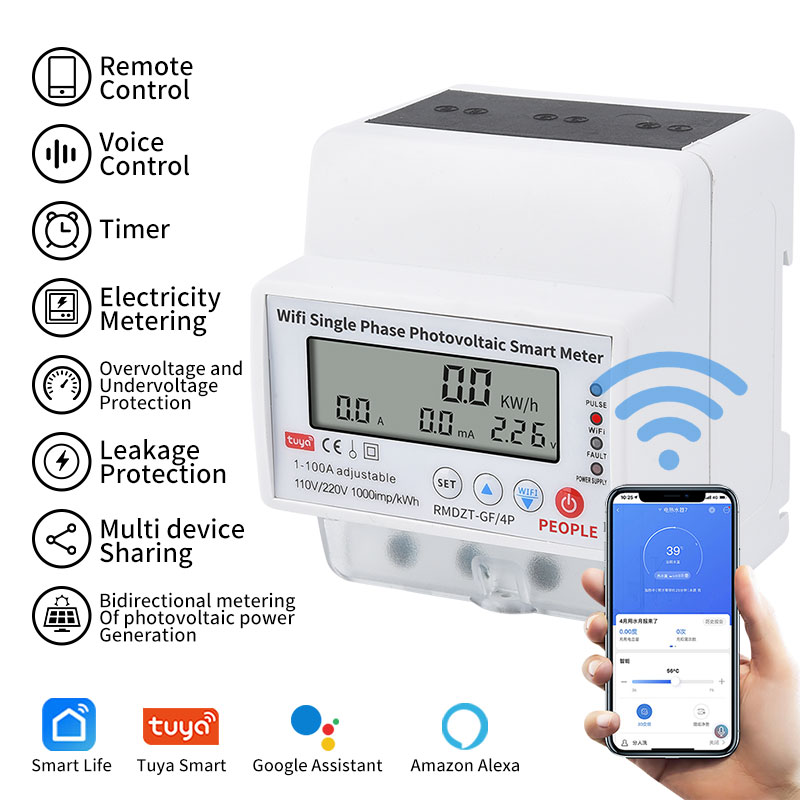
For the vast majority of standard residential setups, a single phase WiFi energy meter rated for 100A is the most practical choice. This specific capacity comfortably handles modern household loads while providing real-time tracking and seamless smart home integration. However, safety and precision remain paramount during installation.
Before attempting any modifications, always turn off the main breaker to isolate the supply. Using a certified voltage tester, identify the incoming Live and Neutral wires. The incoming grid Live wire must be securely anchored to the L-IN terminal. Subsequently, the outgoing Live wire feeding the house must connect to the L-OUT terminal. Establishing this baseline is the first critical step for any field technician.
Moving beyond basic theory, the physical setup of an external clamp requires methodical execution. Field engineers follow a strict checklist to prevent call-backs.
First, identify the main Live incoming cable. Never clip the sensor around both the Live and Neutral cables together. Their opposing magnetic fields will cancel each other out, resulting in a flat zero reading. Next, clip the casing around the main Live wire. You must ensure the printed directional arrow points strictly toward the load. Afterward, plug the communication wire firmly into the designated port. Always double-check the polarity of the plug if it lacks a universally keyed connector. Finally, restore power, boot up the inverter, and open the companion app to confirm that the telemetry aligns logically with your current household usage.
Commercial facilities, industrial workshops, and sprawling residential estates typically operate on a robust three-phase electrical supply. Monitoring these heavy-duty networks requires a three phase photovoltaic smart meter designed for a 3-phase 4-wire setup. Here, the complexity multiplies. The installer must manage three separate live wires labeled L1, L2, and L3. Each wire carries alternating current separated by 120 degrees of phase rotation.
You must ensure that the Grid-to-Load principle is respected uniformly across all three lines. The Phase 1 main cable must strictly correspond to the first clamp and the L1 voltage terminal on the hardware. Cross-phasing is a diagnostic nightmare. If a clamp is placed on the L1 cable but plugged into the L2 terminal, the phase angle calculation will fail entirely. This yields erratic and useless data.
A frustratingly common mistake encountered during commercial commissioning is inconsistent orientation due to cramped electrical panels. An installer might get the first two clamps facing the right way, but flip the third to save space.
Uniformity is non-negotiable. You must visually verify that all three arrows point toward the load. Crossing the cables or reversing just one clamp will result in wildly inaccurate Power Factor readings. If you observe a negative wattage on a single phase while the others are positive, it is a definitive indicator of a mismatched sensor on that specific line.
If your dashboard is displaying chaotic numbers and you suspect an orientation error, a digital multimeter is the ultimate diagnostic tool. By carefully measuring the voltage across the terminals, a technician can confirm which wire is the true grid supply and which feeds the house. Clamp-on multimeters can also measure the directional current on each phase to cross-reference with the display. Because these tests require proximity to live uninsulated busbars, they should only be performed by a licensed electrician to prevent arc flash incidents.
For homeowners, the safest and fastest way to troubleshoot is through the integrated software platform. This method requires zero contact with high voltage. Temporarily disable your solar inverter so your home is entirely reliant on the grid. Open your monitoring app and observe the real-time power flow.
If the app displays positive import power, your physical wiring and sensor orientation are correct. Conversely, if the app shows export power while the solar is completely shut down, it is physically impossible. This proves definitively that your clamp or inline wiring is backward and needs to be physically flipped.
Achieving flawless monitoring goes beyond understanding orientation. It inherently requires capable hardware. Upgrading to modern equipment is often the most effective strategy to ensure your production and storage metrics are recorded with absolute precision.
True bidirectional measurement is critical. For instance, upgrading to a 100A bidirectional energy meter with a 4P configuration and Tuya integration provides flawless two-way tracking. A standard unidirectional device will simply add exported energy to your consumption total. This effectively charges you for the power you generate. You must select hardware that maintains separate registers for imported and exported energy.
Furthermore, look for a device with a Class 1.0 or Class 0.5S accuracy rating. High accuracy ensures that minor fluctuations in inverter output or grid voltage do not skew your long-term financial data. Advanced models also offer software-reversible polarity. If an installer accidentally clips the sensor backward, you can invert the reading direction directly within the mobile app. This instantly corrects the data flow without exposing yourself to live electrical hazards. Finally, high-quality hardware mitigates human error through explicitly labeled terminals, such as L-IN from Grid and L-OUT to Load.
Many assume the basic hardware provided by their utility company will suffice indefinitely. However, as energy demands grow, homeowners frequently upgrade from single-phase to three-phase power. The addition of Electric Vehicle chargers or high-capacity heat pumps usually drives this change. In this scenario, legacy single-phase hardware becomes entirely obsolete.
Similarly, transitioning to a hybrid system with battery storage necessitates an immediate upgrade. Battery Management Systems require millisecond-accurate directional data to decide whether to charge from excess solar or discharge to support heavy loads. An outdated device with slow refresh rates will severely bottleneck your system efficiency.
Ensuring the correct wiring direction on your monitoring equipment is the foundational step to a successful and highly accurate renewable energy system. By strictly adhering to the Grid-to-Load principle, you eliminate the crippling risks of reverse polarity. You must always verify that sensor arrows point firmly toward your home and match phases meticulously. Taking the time to double-check these physical connections guarantees that every kilowatt of clean energy you generate is accurately measured. This protects your batteries from phantom drains and maximizes your financial return on investment.
Ready to upgrade your solar monitoring infrastructure? Stop losing money to faulty data and phantom battery drains. Explore the full range of professional-grade monitoring solutions at People Elect to find the exact hardware tailored for your residential or commercial setup.
If the clamp is installed backward, the hardware will interpret the flow of alternating current in reverse. The logic board will register grid consumption as solar export, and solar export as grid consumption. Financially, this ruins your utility billing. Technically, it thoroughly confuses hybrid inverters. This error potentially causes your expensive solar batteries to discharge power directly into the utility grid at night to cover a false load.
The universal golden rule is that the arrow must point away from the utility grid and toward the load. The load is your home main breaker panel or the inverter. In electrical engineering terminology, it points from the Source to the Consumer. If you are unsure, turn off your solar inverter and check your app. If it shows a positive import value while drawing grid power, the arrow is oriented correctly.
No, standard unidirectional models cannot accurately measure solar export. They are designed to measure energy flowing in only one direction. If you push excess solar energy back through a standard device, it will simply register the reverse current as forward consumption. You will literally be billed by the utility company for the clean energy you are giving them for free.
A negative power factor or a negative active wattage reading on a specific phase usually indicates a severe orientation error or a phase mismatch. The most common cause is that the clamp for that specific phase is clipped on backward. Alternatively, cross-phasing may have occurred. This happens when a sensor measuring the L1 wire is mistakenly plugged into the L2 terminal, causing the mathematical calculation to fail entirely.
Yes, it is highly recommended and often legally required to hire a certified electrician. Even if the fix appears as simple as unclipping a split-core sensor and flipping it around, working inside a main electrical distribution panel exposes you to extreme danger. The incoming utility lines remain live even when you turn off your home main breaker. This poses a lethal shock or arc flash hazard.
While reversed orientation will not cause immediate electrical fires or blow fuses, it can indirectly damage your system over time. The false data forces the inverter to make incorrect decisions regarding battery cycling. Constant, unnecessary discharging and recharging based on phantom loads will severely degrade your battery cells and wear out the inverter internal switching components prematurely.
You can safely test orientation using your smart application. Simply shut down your solar inverter so that no solar energy is being generated. Turn on a heavy household appliance like an oven or a heat pump. Check your mobile app dashboard. If the system shows that you are exporting power to the grid, your clamps are physically backward and need to be reversed.