Views: 0 Author: Site Editor Publish Time: 2026-11-04 Origin: Site
Manage hundreds of smart home devices across a sprawling commercial property? Manual setup in expansive commercial spaces wastes valuable time. Scaling traditional networks often causes severe congestion, IP conflicts, and frustrating errors. Demand for large-scale smart home deployments in hotels, multi-family residential buildings, and corporate offices continues to skyrocket. Consequently, facility managers face a harsh reality. Managing dozens or hundreds of devices manually is no longer a viable business model.
Scaling a smart lighting system introduces unique hurdles. Without the right infrastructure, integrators face tedious manual configurations. Migrating or copying automations across hundreds of identical rooms becomes a logistical nightmare. The smart wall switch ecosystem powered by Tuya presents the ultimate solution for these massive bulk rollouts. This ecosystem offers a proven track record of stability alongside seamless integration capabilities with local platforms like Home Assistant and SmartThings. Coupling this with the robust performance of Zigbee-based hardware eliminates the growing pains of mass deployment. This comprehensive guide covers proven strategies for enterprise-scale projects. We will explore everything from choosing the right communication protocol to executing advanced software configurations.
Exceptional Scalability: The hardware ecosystem provides a highly reliable infrastructure for high-volume deployments in hotels, offices, and multi-family residential properties.
Protocol Superiority: Deploying Zigbee-based hardware establishes a robust, self-healing mesh network. This effectively prevents local router overload during massive bulk rollouts.
Automation Efficiency: System integrators can leverage advanced configuration methods to clone, migrate, and manage hundreds of scenes without tedious manual repetition.
Platform Flexibility: These devices integrate flawlessly into enterprise-grade local controllers utilizing custom APIs and Edge Drivers.
Multi-Functional Hardware: High-density control units drastically reduce wall clutter, wiring time, and material costs while maximizing granular lighting control.
Enterprise installers, commercial electricians, and smart building integrators consistently select this ecosystem for massive infrastructure projects. The primary reason stems from the platform's demonstrated ability to handle high-volume device management. System stability remains rock-solid even under heavy loads, and response times never degrade.
Analyzing broader commercial real estate trends reveals a rapid shift toward Environmental, Social, and Governance compliance. This shift is heavily accelerating IoT adoption across the industry. Building owners operate under immense pressure to reduce energy consumption and secure green building certifications. Therefore, facility managers are prioritizing centralized, low-power mesh networks. These networks can intelligently automate lighting and HVAC systems based on real-time occupancy. In this evolving landscape, deploying a scalable and interoperable ecosystem is an operational necessity rather than a mere technological luxury.
Deploying smart lighting across a 200-room hotel demands flawless execution. Network reliability becomes the single most critical metric. The architecture supports both cloud-based and local control execution. Having hundreds of switches active simultaneously can easily cripple standard consumer-grade systems in high-density environments. In contrast, enterprise solutions utilize edge gateways that process commands locally. The internal network of smart switches continues to function flawlessly even if the external internet connection drops due to an ISP outage. The local gateway ensures latency remains under 200 milliseconds. A guest pressing a physical button in their suite experiences the immediate, buttery-smooth feedback expected in a luxury environment.
Furthermore, managing a bulk rollout requires meticulous record-keeping. The IoT platform provides administrators with centralized dashboards. These interfaces maintain detailed configuration records, operational logs, and real-time device states. Facility managers can view the online or offline status, firmware version, and signal strength of every node in the building from a single screen. This eliminates the need to dispatch a technician to physically inspect each room. The system logs the exact timestamp and error code if a specific switch experiences connectivity issues. Technicians can then diagnose and resolve the issue remotely before the end-user ever notices a problem.
Making the right protocol decision at the bottom-of-funnel purchasing stage is absolutely critical. This choice dictates the long-term success of any bulk rollout. Wi-Fi switches remain popular for single-home DIY projects. However, they are fundamentally unsuited for commercial mass deployments.
Zigbee operates on the IEEE 802.15.4 standard and utilizes a mesh network topology. Every device connects directly to the central router in a traditional Wi-Fi network, acting as an isolated endpoint. Conversely, every hardwired device in a Zigbee network acts as a repeater. Adding more devices actually strengthens the overall range and resilience of the network. A premium Zigbee dimming switch exemplifies this perfectly. The network automatically reroutes the signal through neighboring switches if one unit loses power due to a tripped breaker. This self-healing characteristic is essential for massive scale. A single enterprise Zigbee gateway can comfortably manage up to 200 devices, creating a highly stable web of interconnected nodes.
Standard 2.4GHz Wi-Fi routers are typically designed to handle 30 to 50 concurrent client connections. Connecting hundreds of Wi-Fi smart switches to a commercial network inevitably results in severe bandwidth bottlenecks. IP address conflicts and dropped packets will quickly follow. Positioning Zigbee as the professional standard ensures the smart lighting system remains entirely isolated from the corporate or guest Wi-Fi network. This strict separation guarantees robust cybersecurity and uninterrupted lighting performance.
Integrators frequently discuss the tedious nature of programming identical automations across hundreds of devices in professional forums. Manually configuring scenes for 50 identical hotel rooms is a fast track to project delays and blown budgets. Efficiency requires a smarter approach.
Professionals utilize batch-configuration strategies to bypass manual repetition. Native consumer apps often have limitations regarding direct cloning. Enterprise users, however, access dedicated Developer Platforms. Integrators can write simple Python scripts through the API to extract the JSON configuration payload from a fully configured switch. They then push that exact payload to an array of new Device IDs. Additionally, third-party management tools designed for smart building operators allow for bulk scene deployment. System admins can select a group of devices, assign a predefined automation rule, and apply it instantly across an entire floor.
Establishing a golden record or master template represents the most efficient methodology for mass deployment. Integrators first install and meticulously configure a single room. This process includes setting precise minimum and maximum brightness thresholds on a dimmer. It also involves defining double-tap behaviors and creating default power-on states. The configuration is saved as a template once this master room operates perfectly. Technicians simply pair the new devices to the gateway during the physical rollout. The software then automatically provisions them with the master template parameters based on their assigned room type.
Advanced users and commercial integrators often mandate strict data privacy and entirely local control. Integrating hardware into Home Assistant is the preferred architectural route for these high-security projects.
Unifying disparate smart home ecosystems is a common challenge in large buildings. HVAC systems might be controlled by one manufacturer while lighting uses another. Home Assistant serves as the ultimate agnostic bridge. Administrators utilize the official integration to migrate a setup, which requires creating a cloud project to obtain authentication keys. Home Assistant automatically imports all devices once authenticated. Exposing their entities to the powerful automation engine allows a wall switch to interact seamlessly with security cameras and environmental sensors from entirely different manufacturers.
The official cloud API is undoubtedly robust. Yet, optimizing for zero latency requires local execution. Integrators often deploy custom components via the Home Assistant Community Store. Extracting the local authorization keys for each device allows Home Assistant to communicate directly with the switch over the local area network. This is particularly crucial for dimming operations. Cloud round-trip delays can cause stuttering when a user slides a digital brightness bar or triggers a complex lighting fade-in scene. Local control ensures the dimming transition remains instantaneous. This delivers the premium user experience expected in high-end commercial spaces.
SmartThings remains a highly popular platform for medium-scale bulk rollouts. It offers an excellent balance of user-friendly interfaces and powerful backend capabilities.
The ecosystem has transitioned away from legacy cloud-based execution. It now relies on local Edge Drivers written in Lua. This shift significantly improves response times and reliability. Administrators must enroll their hub in community developer channels to download appropriate Zigbee Edge Drivers for specialized hardware. Advanced devices often use custom Zigbee clusters. Standard generic drivers might not expose all functionalities. Sourcing verified Edge Drivers ensures the hub correctly identifies the device fingerprint. This enables full local control without relying on external cloud servers.
High-density deployments often utilize multi-button keypads. Physical actions on these keypads trigger complex digital routines. Configuring these within the platform requires precise mapping. Integrators map specific physical button presses to distinct actions using advanced Edge Drivers. A single tap on the top button might turn on the main overhead lights. A double tap could activate a presentation mode, which dims lights to 20 percent and lowers the motorized blinds. A long hold could execute a goodnight routine, turning off every device in the room. This technical mapping transforms a simple switch into a comprehensive room controller.
Minimizing wall clutter and reducing hardware redundancy are top priorities when planning a bulk rollout for commercial spaces. Facility managers frequently face the challenge of installing multiple single-gang switches. Controlling different lighting zones, window treatments, and exhaust fans traditionally requires expansive wall real estate. This outdated approach detracts from interior aesthetics and exponentially increases installation time. Deploying multi-functional hardware is the modern engineering solution.
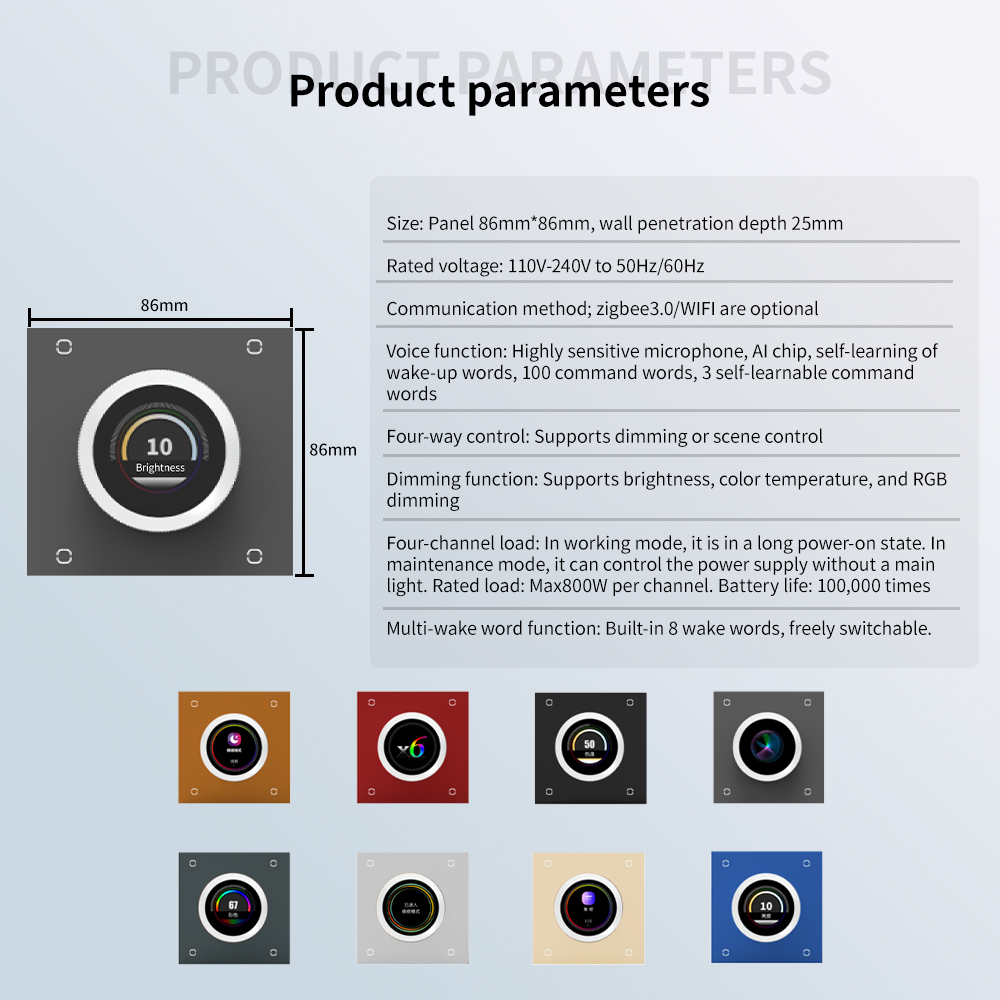
A single room often features multiple lighting layers in high-end environments. These include recessed downlights, perimeter LED strips, and task lighting. High-tier products like the Multi-functional ZIGBEE Smart Dimming Switch X6 Dim 4L 4-Button allow users to control up to four distinct lighting circuits from a single standard gang box. These devices operate as a localized command center. Dimming commands are transmitted locally within the mesh network using the Zigbee 3.0 protocol, ensuring near-zero latency.
Integrators often upgrade to the Multifunctional Intelligent TUYA ZIGBEE dimming switch X6 Dim 8L 8-button Switch for even more complex environments like executive boardrooms. An 8-button configuration provides unparalleled flexibility. Integrators can map the top four buttons to direct hardwired lighting loads. Simultaneously, they can program the bottom four buttons to trigger complex digital scenes executed through the local gateway.
The financial benefits of utilizing multi-functional switches become immediately apparent when calculating labor and material costs. Electricians typically charge per electrical box installed and wired. Project managers significantly reduce the time spent cutting drywall, pulling Romex cables, and terminating connections by replacing four individual single-gang switches with one 4-button multi-gang switch.
Metric | Traditional Single-Gang Setup | Multi-Functional 4-Button Setup | Efficiency Gain |
|---|---|---|---|
Total Switches Required | 400 units | 100 units | 75 percent reduction in hardware units |
Gang Boxes Needed | 4-gang box per room | 1-gang box per room | Lower material costs, smaller footprint |
Wiring Time per Room | 45 to 60 minutes | 15 to 20 minutes | Roughly 66 percent reduction in electrical labor |
Network Node Density | 400 individual Zigbee nodes | 100 individual Zigbee nodes | Reduced network traffic, higher stability |
Scaling these time and cost savings across hundreds of units results in a massive reduction in the overall project budget. This makes the initial investment in premium multi-functional hardware highly economical.
Executing a bulk rollout requires more than just purchasing the right hardware. It demands a systematic approach to physical installation and software configuration. Integrators risk creating a fragmented network plagued by connectivity drops and automation conflicts without a standardized operating procedure.
A comprehensive audit of the building electrical infrastructure is mandatory before initiating any large-scale installation. Determining the presence of neutral wires inside the switch boxes is the most critical factor. No-neutral models exist, but deploying switches that require a neutral wire is strongly recommended for bulk rollouts. A switch wired with a neutral connection acts as a full-time Zigbee router. It continuously relays data packets from other devices because it has a constant power supply. This creates a dense, self-healing grid. Conversely, no-neutral switches generally function only as sleeping end-devices, which can lead to dead zones in commercial spaces.
Picture a technician standing in a partially finished hotel corridor. They utilize a centralized staging area instead of running back and forth to a breaker panel and pairing devices one by one in the dark. Technicians temporarily wire the switches to a test bench in this controlled environment. They pair them to the Zigbee gateway, apply firmware updates, and configure basic parameters before the electrician ever mounts them in the drywall.
Implementing a strict and logical naming convention is equally important. Relying on default names makes troubleshooting impossible. System administrators should adopt a hierarchical structure. A format like Building_RoomNumber_DeviceType_SpecificFunction works best. For example, FL3_ConfA_DIM_Chandelier clearly identifies the device. Applying these standardized names during the staging phase ensures configuration records remain perfectly organized for years to come.
Successfully executing a bulk rollout for a commercial property or multi-family building hinges on selecting a robust and scalable ecosystem. Facility managers bypass the bandwidth bottlenecks and instability associated with traditional Wi-Fi setups by leveraging Zigbee mesh networks. Furthermore, utilizing advanced multi-button hardware consolidates control. This dramatically reduces electrical labor and eliminates unsightly wall clutter.
Success in a mass deployment ultimately comes down to meticulous preparation. Auditing electrical wiring for neutral connections is just the beginning. Planning software architecture via Home Assistant, SmartThings, or native enterprise platforms guarantees a smooth handover. Integrators can deploy hundreds of devices efficiently by adhering to strict naming conventions and batch-configuration strategies. We strongly encourage project managers, commercial electricians, and system integrators to explore high-quality, multi-functional Zigbee hardware for their next commercial project. Visit PeopleElect to find the exact smart switch configurations and enterprise-grade solutions tailored for your massive bulk rollouts, and experience these operational benefits firsthand.
Yes, specific no-neutral models are available. These are designed for older buildings that lack standard neutral wiring. These devices use a capacitor to draw a micro-current through the lighting load to stay powered. However, neutral-required models are generally recommended for bulk rollouts. Switches with a neutral wire act as active Zigbee repeaters, strengthening the overall mesh network. No-neutral switches typically act as sleeping end-devices.
A standard consumer-grade Zigbee hub can typically handle between 50 to 100 devices. This depends heavily on network traffic and the number of active routing nodes. However, this is rarely sufficient for commercial bulk rollouts. Integrators should utilize enterprise-grade gateways or deploy multiple coordinating hubs. Using a dedicated Zigbee coordinator paired with Zigbee2MQTT can easily support networks exceeding 200 devices when integrating with local platforms.
Native consumer applications have limitations regarding direct one-to-one cloning of automations. However, integrators rarely program bulk rollouts manually. Advanced users leverage custom API scripts to batch-apply configurations. You can utilize blueprints in local control platforms to create a master automation template. This allows you to deploy identical logic across hundreds of devices in a fraction of the time.
Zigbee operates on a mesh network topology. Every hardwired switch actively extends the wireless signal to its neighbors. If you install 100 Wi-Fi switches, they all attempt to communicate directly with the central router. This leads to severe bandwidth bottlenecks and router overload. A Zigbee network offloads this traffic. Adding more devices actually strengthens the reliability of the network, making it the professional standard for mass deployments.
Yes, provided they are configured correctly. The device operates entirely locally if you integrate a Zigbee-based switch to a local hub using Edge Drivers or custom integrations. Your switch will continue to function seamlessly. It will respond to physical button presses and execute localized automations and scenes without requiring any access to the external cloud.
The standard indoor range between two Zigbee devices is typically 30 to 50 feet depending on wall materials and interference. However, because Zigbee uses a mesh topology, every hardwired switch acts as a repeater. The maximum range of the entire network can cover massive commercial buildings as long as devices are placed within range of each other to continuously daisy-chain the signal back to the main gateway.
Troubleshooting starts at the centralized management dashboard. First, check the operational logs to determine if the offline status is isolated to a single switch or an entire zone. If an entire zone is down, suspect a tripped breaker or a failed routing node upstream. If it is a single switch, verify the physical power connection. Using diagnostic tools within your enterprise platform or local controller can help map the Zigbee mesh routing to identify weak signal links causing the dropouts.