Views: 0 Author: Site Editor Publish Time: 2026-11-21 Origin: Site
Many homeowners wire up a new smart device, open their mobile app, and immediately hit a wall. The "hub required" warning pops up on the screen. Sometimes the device pairs but lacks core functions. You can turn the lights on and off, but advanced features stay locked. Zigbee markets itself as a universal standard. The reality on the ground is fragmented. Manufacturer-specific clusters and legacy profiles create unexpected vendor lock-in. Proprietary gateways force users into closed ecosystems. Consumers fear hub proliferation, dreading a new proprietary bridge plugged into their router for every switch brand. Choosing the right universal coordinator solves this headache. You must evaluate hub compatibility, wiring constraints, and firmware update mechanisms before committing to a specific brand for your smart lighting deployment.
Zigbee 3.0 is Not a Guarantee: While the Zigbee 3.0 protocol standardizes basic communication, manufacturers still utilize custom clusters for advanced features (e.g., multi-tap scenes, power monitoring) that may not translate across all hubs.
Wired vs. Wireless Distinction: A true smart wall switch controls physical electrical loads and acts as a mesh repeater (if a neutral wire is present), whereas battery-powered Zigbee remotes only trigger software scenes and act as end devices.
Hub Architecture Dictates Functionality: Open-source coordinators (Home Assistant/Zigbee2MQTT) offer the highest cross-compatibility, whereas proprietary hubs (Tuya, Aqara, Hue) actively restrict third-party device integration.
Wiring Impacts Mesh Health: A neutral-required smart wall switch acts as a Zigbee router to strengthen the mesh network, whereas no-neutral switches act as end devices and do not extend range.
Smart vs. Dumb Bulb Control: Advanced setups utilize Zigbee binding and decoupled modes to allow a switch to control smart bulbs directly without routing through the hub, ensuring local control even during gateway failures.
Defining success for cross-hub compatibility requires looking beyond basic pairing. True compatibility means reliable pairing, full feature exposure, and stable mesh routing. A device must maintain a strong connection without dropping off the network. It must expose every feature advertised on the box. It must also route traffic efficiently for other devices in the home. When you install a switch, you expect it to work exactly as the manufacturer intended, regardless of the coordinator you use.
Homeowners often confuse hardwired switches with wireless remotes. A hardwired smart wall switch physically cuts or supplies power to a lighting circuit. It contains an internal mechanical or solid-state relay. It wires directly into your home electrical system using the line, load, and neutral wires inside your wall box. A wireless Zigbee remote looks identical from the outside and mounts to a standard wall plate. However, it only sends digital commands to a hub or smart bulb. It operates on battery power. It cannot control a physical electrical load. If you turn off the breaker and remove your old switch, a wireless remote cannot take its place to switch the actual voltage.
The Zigbee protocol has evolved significantly over the past decade. Early iterations relied on fragmented legacy profiles. Zigbee Home Automation (ZHA) handled security sensors and relays. Zigbee Light Link (ZLL) handled smart bulbs. Devices on different profiles rarely communicated well. The Zigbee 3.0 standard unified these profiles into a single language. It mandated stricter security protocols and standardized device behaviors across the board.
Despite this unification, older hubs often fail to properly interview newer Zigbee 3.0 switches. An older gateway might not recognize the security keys required by a modern device. It might fail to parse the device descriptors during the initial pairing process. When you hold the pairing button on the switch, the hub receives the signal but cannot decode the device signature. This results in devices showing up as "unknown" in your control app, leaving you with a useless piece of plastic on your wall.
Zigbee communication relies on data clusters. Standard clusters handle basic commands. The OnOff cluster (0x0006) turns a relay on or off. The LevelControl cluster (0x0008) handles dimming percentages. Almost every hub understands these standard clusters. This explains why basic functionality usually works across different ecosystems right out of the box.
Brands differentiate their products using proprietary data clusters. They write custom code for advanced features. LED indicator color changes, double-tap actions, and decoupled modes rely on these custom clusters. A generic hub does not know how to read or write to these manufacturer-specific endpoints. The advanced functions remain hidden. You lose the premium features you paid for unless you use the manufacturer's native hub or a highly customized open-source coordinator.
Preventing router clutter requires selecting the right coordinator. You must compare the three primary tiers of Zigbee hubs. Each tier offers a different balance of user-friendliness and device compatibility. If you plan to install a smart wall switch zigbee device, your hub choice dictates your entire experience.
Closed ecosystems prioritize stability over flexibility. Brands like Aqara, Tuya, and Philips Hue design their hubs to work perfectly with their own hardware. They actively restrict third-party device integration. You might manage to pair a generic bulb to a Hue bridge. However, you will likely lose firmware update capabilities and advanced scene controls.
Aqara switches offer premium hardware and excellent tactile feedback. They feature advanced options like power monitoring and decoupled mode. If you pair an Aqara switch directly to an Amazon Echo, those advanced features vanish. You only get basic on/off control. This limitation drives hub proliferation. Users end up buying a separate bridge for every brand they install, cluttering their network rack and consuming every available ethernet port on their router.
Platforms like SmartThings, Hubitat, and Amazon Echo aim for broader compatibility. They do not manufacture the majority of the end devices. They rely on custom device handlers or Edge drivers to translate proprietary clusters. Community developers often write these drivers when official support lags.
Devices engineered for broad compatibility thrive here. Certain brands design their firmware specifically to expose advanced features across these agnostic platforms. You can access multi-tap scenes and LED notifications without a proprietary gateway. The primary trade-off is delayed support. When a brand releases a new switch, you must wait for a developer to write a compatible driver. You also rely on the platform's cloud infrastructure in some cases, which introduces latency.
Open-source platforms yield the highest compatibility rate for any smart home hardware. Home Assistant, paired with ZHA or Zigbee2MQTT, offers unparalleled control. These platforms do not rely on official corporate partnerships. They rely on community-driven reverse-engineering.
Developers capture the Zigbee traffic from proprietary hubs. They decode the manufacturer-specific clusters. They integrate these translations directly into the open-source software. This allows you to mix and match hardware from dozens of different brands on a single Zigbee mesh network. You gain access to every hidden feature without needing multiple bridges. Setting up Zigbee2MQTT requires flashing a USB dongle and configuring MQTT brokers, but the payoff is total local control.
Hub Category | Setup Difficulty | Cross-Brand Compatibility | Advanced Feature Access | Cloud Dependency |
|---|---|---|---|---|
Proprietary (Tuya, Aqara, Hue) | Very Low (Plug and Play) | Poor (Restricted Ecosystems) | Excellent (Native Devices Only) | High |
Commercial Agnostic (SmartThings, Hubitat) | Medium (Requires Custom Drivers) | Good (Relies on Community) | Moderate (Depends on Driver Quality) | Medium |
Open-Source (Home Assistant, Zigbee2MQTT) | High (Requires Technical Knowledge) | Excellent (Universal Translation) | Excellent (Full Cluster Exposure) | None (100% Local) |
Physical home wiring dictates device selection and network stability. You cannot ignore the infrastructure inside your electrical boxes. Older homes built before the 1980s often lack neutral wires in the switch boxes. Modern building codes require them. This single wire changes how your entire smart home communicates. Before buying hardware, you must open your junction boxes and inspect the wiring.
Zigbee relies on a mesh topology. Devices do not just talk to the central hub. They talk to each other. They pass messages along like a bucket brigade. This extends the range of the network far beyond the physical limits of the central coordinator. A strong mesh network routes around interference and dead zones automatically.
Switches with a neutral wire receive constant electrical power. The internal radio stays active 24/7. These devices act as Zigbee routers. They receive signals from distant sensors and repeat them back to the hub. Installing neutral-wired switches throughout your home creates a robust, self-healing mesh network. If one switch fails, the network automatically routes traffic through a different switch. When you open a wall box, look for a bundle of white wires tied together with a wire nut tucked in the back. That is your neutral bundle.
Many older homes only have a hot wire (line) and a load wire in the switch box. The neutral wire bypasses the switch and goes straight to the light fixture. No-neutral switches solve this physical limitation. They pull a tiny amount of trickle current through the lighting circuit itself. They pull just enough power to keep the Zigbee radio alive without actually illuminating the bulb.
This design comes with strict limitations. No-neutral switches cannot act as Zigbee routers. They must operate as "sleepy end devices." If they stayed awake constantly to route traffic, they would draw too much current. This would cause the attached light fixtures to glow or flicker when turned off. You often must install a bypass capacitor at the light fixture. This component wires in parallel with the load. It absorbs the trickle current and prevents low-wattage LED bulbs from flashing.
Turn off the breaker at the main electrical panel.
Remove the wall plate and unscrew the existing switch.
Pull the switch forward and inspect the back of the box.
Look for a bundle of white wires capped together. If present, you have a neutral wire.
If you only see a black wire entering the switch and a black (or red) wire leaving it, you likely need a no-neutral smart switch.
Mapping specific switch types to lighting goals unlocks unexpected smart home use cases. Basic on/off control barely scratches the surface. Advanced setups require understanding power modulation, digital commands, and direct device communication. You must match the switch hardware to the specific type of bulb in the fixture.
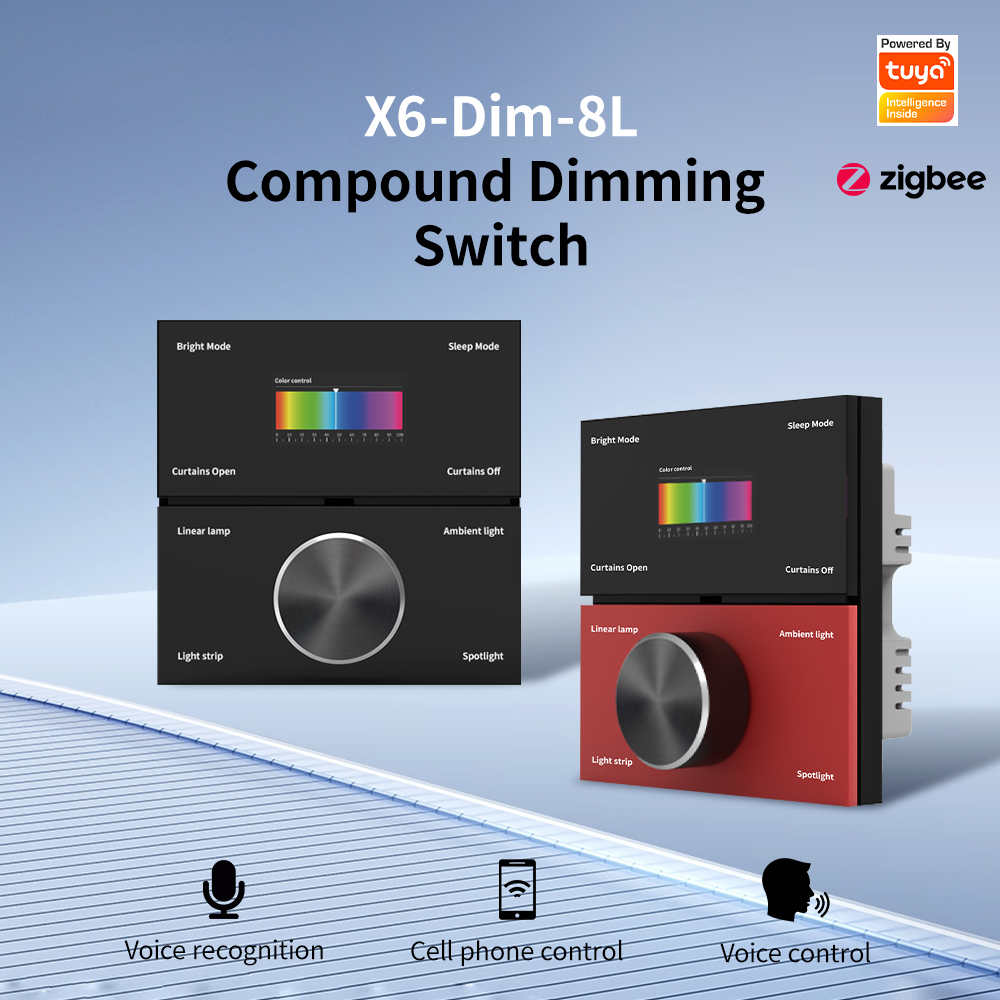
Controlling brightness requires specific hardware. Integrating a Zigbee dimming switch involves evaluating your light fixtures. Standard dimmers cut physical power to the bulb rapidly. This is known as TRIAC or phase-cut dimming. It works perfectly for traditional incandescent bulbs and dimmable dumb LEDs. The switch physically chops the AC sine wave to reduce the voltage reaching the bulb.
However, sending physical phase-cut power to a smart bulb will destroy its internal circuitry. Smart bulbs require constant, unmodulated 120V power. If you want to dim a smart bulb, you must send digital dimming signals through the Zigbee mesh. You must ensure your chosen dimming switch can separate its physical relay from its digital dimming commands. Compatibility issues frequently arise between specific dimming models and low-voltage LED drivers. Always verify minimum wattage requirements before installation to prevent flickering at low dim levels.
Smart bulbs create a frustrating user experience when paired with traditional switches. If someone flips the physical switch down, the smart bulb loses power. It drops off the network. Your automations fail. Voice commands stop working. You end up taping over your light switches to prevent family members from turning them off.
Advanced switches solve this using decoupled mode. This software feature disconnects the internal physical relay from the physical button on the wall. The relay stays permanently closed. Constant power flows to the smart bulbs. When you press the physical button, it no longer cuts the power. Instead, it sends a digital command to your hub. The hub then tells the smart bulb to turn off. The bulb goes dark, but it remains powered and connected to the network.
Relying on a central hub for every command introduces latency. If the hub crashes or reboots, your wall switches stop working. Direct Zigbee binding eliminates this single point of failure. It links a switch directly to a bulb's Zigbee group at the protocol level.
When you press the switch, the command travels straight to the bulb. It bypasses the hub entirely. This results in instantaneous response times. You can control your lights even if the primary coordinator goes completely offline. Binding requires careful hardware selection. Both the switch and the bulb must support the exact same Zigbee clusters. If the switch sends a LevelControl command, the bulb must know how to receive it. You configure this binding through your hub's interface, but once set, the devices communicate peer-to-peer.
Modern switches act as central keypads for your entire home. You are no longer limited to controlling the attached light fixture. Multi-tap scene control allows you to trigger complex automations from a single wall box. This turns a standard light switch into a powerful macro controller.
You can program a double-tap to arm your security system on your way out the door. A triple-tap could close all the smart blinds in the living room. Holding the bottom paddle for three seconds could activate a "goodnight" routine. This routine might lock the doors, turn down the thermostat, and shut off all interior lights simultaneously. These features require a hub capable of translating multi-tap clusters and a switch firmware that supports scene control.
Cross-hub deployments introduce specific failure points. You must plan for network instability and firmware management challenges. Ignoring these risks leads to a frustrating user experience where lights fail to respond or devices drop offline randomly.
Mixing incompatible router devices destroys mesh stability. Certain brands implement non-standard routing behaviors. They might drop data packets originating from competitor devices. A sensor might connect to a switch, but the switch refuses to pass the message back to the hub. The sensor appears offline, even though it has a full battery and sits right next to a router.
Mitigate this risk through strategic hardware selection. Standardize on a single brand for your hardwired routing devices. Use one reliable brand for all your neutral-wired wall switches and smart plugs. This creates a solid, unified backbone for your network. You can then safely mix brands for your battery-powered end devices. The end devices will route reliably through the standardized backbone. Check your hub's network map periodically to identify weak links or devices with low Link Quality Indicator (LQI) scores.
Manufacturers constantly release firmware updates to fix bugs and improve performance. Over-The-Air (OTA) firmware updates are traditionally delivered via the manufacturer's native hub. If you use a third-party coordinator, you lose access to the official update servers. Your devices remain stuck on factory firmware.
You can overcome this limitation using open-source tools. Platforms like Zigbee2MQTT maintain massive community repositories of firmware files. Developers extract these files from official hubs and upload them to the repository. Your open-source coordinator can download these files and push the OTA updates directly to your devices. This allows you to maintain updated hardware without keeping a proprietary gateway plugged in. Always run OTA updates one device at a time to prevent network congestion.
Choosing a smart home architecture requires balancing convenience against control. No single approach works for every homeowner. You must evaluate your technical comfort level and long-term goals before buying dozens of switches.
Sticking to a single brand offers distinct advantages. You get guaranteed compatibility out of the box. Firmware updates happen automatically with one click. If something breaks, you have a single point of contact for customer support. The setup process requires zero technical knowledge. You wire the switch, scan a QR code, and it works.
The downsides are significant. You face higher hardware costs. You are limited to the aesthetic choices offered by that specific manufacturer. Most importantly, you rely heavily on the manufacturer's cloud servers. If the company goes out of business or experiences a server outage, your smart home stops functioning properly. You also lose the ability to integrate specialized hardware from other brands.
Universal hubs eliminate vendor lock-in completely. You gain complete local control over your devices. Automations run instantly without bouncing to a cloud server. You can mix hardware based on features and aesthetics. You eliminate hub proliferation entirely, running your entire house off a single USB dongle.
This flexibility requires substantial maintenance overhead. You face a steep learning curve. You must manage custom drivers and update them manually. When mesh routing issues occur, you must self-troubleshoot using network maps and LQI values. There is no customer support hotline for a custom open-source deployment. You become the IT administrator for your own house.
A Zigbee smart wall switch absolutely can work across different hubs. However, the depth of functionality depends entirely on the openness of the coordinator and the standardization of the switch's firmware. Basic on/off control is almost universally supported. Advanced features require careful planning and capable hardware. Do not assume a switch will expose all its features just because it uses the Zigbee protocol.
Your shortlisting logic should align with your technical comfort. For plug-and-play reliability, stick to a single-brand ecosystem for both the hub and the switches. For maximum hardware flexibility without writing code, utilize Hubitat or SmartThings with community drivers. For absolute control, direct binding, and decoupled modes, deploy Home Assistant with a dedicated Zigbee dongle.
Take these actionable steps before purchasing any new hardware:
Audit your existing wall boxes to confirm the presence of neutral wires.
Inventory your current smart bulbs to determine if you need a standard relay or a digital dimming switch.
Select and configure your primary hub architecture to ensure it supports the specific features you require.
Test a single switch from your chosen brand before buying hardware for the entire house.
A: Yes. Zigbee devices communicate on a different radio frequency than Wi-Fi. You need a Zigbee coordinator to bridge the mesh network to your Wi-Fi or Ethernet network. This bridge allows your mobile app and automation platform to communicate with the switches, resolving the common "hub required" warning.
A: Yes, basic on/off functionality usually works immediately via generic Zigbee drivers. However, custom Edge drivers are often required to expose advanced features. Multi-gang switches, power monitoring, and specific LED indicator controls will likely require community-developed drivers to function properly within SmartThings.
A: A standard switch uses a simple relay to toggle physical power on and off. A dimming switch modulates the physical power using a TRIAC or MOSFET component to lower brightness. This physical modulation works for dumb bulbs but can damage smart bulbs, which require constant unmodulated power.
A: No. Wireless remotes are battery-powered end devices that mount to a wall but do not connect to high-voltage wires. They only send digital commands. True smart wall switches are hardwired directly into your home's electrical circuits to physically control the flow of electricity to light fixtures.
A: Yes, provided your hub processes automations locally. Zigbee is a local mesh protocol. If your internet drops, local control remains active. Direct Zigbee binding further enhances this by allowing switches to communicate directly with smart bulbs even if the central hub loses power or crashes.
A: You can perform Over-The-Air (OTA) updates using open-source platforms like Zigbee2MQTT or ZHA. These platforms maintain community repositories of firmware files. As long as the manufacturer's firmware file has been captured and uploaded to the repository, your open-source coordinator can push the update.
A: Yes. Smart switches are specifically designed to make standard lighting circuits smart. By controlling the physical electrical load at the wall box, they allow you to automate and remotely control traditional incandescent, halogen, or standard LED fixtures without needing to buy individual smart bulbs.