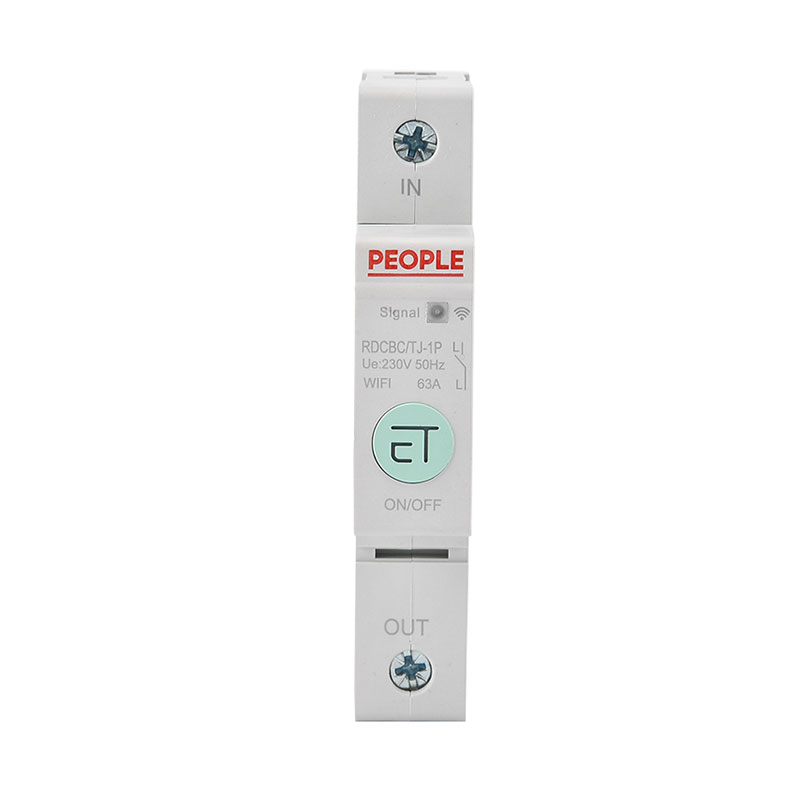
Views: 0 Author: Site Editor Publish Time: 2026-11-12 Origin: Site
Have you ever finished a job, handed over the keys, and suddenly received a frantic call because the client could not connect to their new electrical panel? Upgrading to a modern smart circuit breaker is a massive game-changer for contemporary homes and commercial spaces. It offers unprecedented remote control over entire electrical systems. However, physically wiring the device into the panel is only half the battle.
As an electrician, a general contractor, or a homeowner preparing to sell a modernized property, knowing exactly how to execute a proper handover is absolutely critical. A poorly managed transition leaves the new user locked out of essential features. It frustrates them with connectivity issues and leaves the network vulnerable to cybersecurity gaps. In this comprehensive guide, we will walk you through the essential physical safety checks, the nuances of transferring digital app credentials, and the practical tips required to ensure a seamless professional transition.
Safety Always Comes First: Rigorously verify physical wiring, terminal torque, and load capacities before even attempting to initiate the digital handover.
Digital Transfer is Non-Negotiable: Handing over the hardware requires permanently unbinding the device from the initial installer testing account. It must be securely paired with the private smartphone of the end-user.
Ecosystem Integration: Devices operating on established platforms make the digital transfer intuitive through streamlined account sharing and structured home management settings.
User Education is Mandatory: A successful handover means actively teaching the new user how to configure automated schedules, monitor real-time energy usage, and remotely control appliances.
Highlighting Bottom-Line Value: Transitioning from a traditional mechanical switch to an internet-enabled alternative adds measurable property value. The handover is the perfect moment to demonstrate these long-term operational benefits.
Before diving into the technical steps of a handover, we must look at the broader industry trajectories shaping modern electrical work. The transition toward intelligent electrical infrastructure is accelerating at an unprecedented rate. Driven by global initiatives for energy conservation and grid modernization, property owners are increasingly demanding active energy management rather than passive protection. They want real-time data. They want remote troubleshooting capabilities.
Consequently, mastering the handover of these connected panels is no longer a niche skill for tech-savvy electricians. It has become an absolute industry standard. The handover process matters significantly because you are not merely walking away from a physical copper-and-plastic switch. You are transferring administrative ownership of a digital smart home hub. If the digital handover is ignored, the new user will be completely locked out. This renders the advanced hardware no more useful than a standard non-connected breaker, effectively wasting the entire investment.
While a traditional miniature circuit breaker serves a single vital purpose—tripping during an electrical overload or short circuit to prevent fires—an intelligent breaker performs this critical safety function while simultaneously streaming data to the local network.
To better understand the operational differences that necessitate a specialized handover, consider this objective comparison. It highlights exactly what the end-user is gaining.
Feature Dimension | Traditional MCB | WiFi Smart Circuit Breaker |
|---|---|---|
Primary Function | Overload and short-circuit protection. | Overload protection, plus remote switching. |
Connectivity | None, purely mechanical or thermal-magnetic. | 2.4GHz wireless network integration. |
Data Tracking | None. | Real-time voltage, current, and kilowatt-hour monitoring. |
Remote Access | Requires physical manual toggling. | App-based control from any global location. |
Electrical safety must always precede digital convenience. Before you even open a smartphone app, you must be absolutely certain the physical installation is flawless. As frontline installers, we know that skipping these basic checks leads to dangerous callbacks.
Physical integrity is the bedrock of any successful handover. Electricians must verify several mechanical parameters before introducing the end-user to the system.
Verify the Wiring and Gauge: Double-check the Line and Neutral connections for proper orientation. Ensure the gauge of the copper wire strictly matches the rated amperage of the breaker. Incorrect wire sizing inevitably leads to overheating.
Terminal Torque Specifications: Use a calibrated torque screwdriver to ensure all terminal screws are tightened to the exact specifications of the manufacturer. Loose connections are a primary cause of electrical arcing and localized heat buildup. This heat can permanently fry the sensitive internal logic boards.
Manual Mechanical Testing: Before connecting the device to the local WiFi network, manually toggle the physical switch. You should feel a firm and satisfying click. This ensures the mechanical switching mechanism operates smoothly without binding.
Electrical Load Testing: Apply a safe and measured electrical load to the circuit. Utilize a clamp meter to verify that the current flowing through the wire matches the data being read by the internal sensors of the breaker.
The most critical—and often most frustrating—part of handing over a connected electrical system is the digital transfer. Most top-tier devices, such as the Tuya WiFi smart circuit breaker, operate on widely supported and highly secure cloud ecosystems.
To hand the digital system over to the client securely, walk them through these standardized steps.
First, instruct the end-user to download the control app, such as Tuya Smart, from their respective app store. Have them create a personal account using a secure email address. Next, press and hold the physical pairing button located on the front panel of the breaker for approximately 5 to 10 seconds. Release the button when the LED indicator begins to blink rapidly. This signals that the device is actively broadcasting its setup network.
In addition, ensure the smartphone of the user is actively connected to a 2.4GHz wireless network. It is a standard industry limitation that smart breakers housed inside thick metal electrical panels rely on the superior wall-penetrating capabilities of 2.4GHz signals. They cannot use faster but weaker 5GHz bands. Finally, guide the user to tap the add icon in the upper right corner of the app interface, select the appropriate breaker category, and input their local WiFi password to finalize the pairing.
If you paired the device to your own smartphone for initial load testing as the installer, you absolutely must remove it before leaving the premises. Failing to do so creates a severe privacy vulnerability.
Navigate to the specific device settings within your installer app. Select the remove device option and explicitly choose to wipe the data. This action severs the cloud connection to your account and forces the breaker back into pairing mode. It frees up the hardware completely. Alternatively, for larger commercial installations or rental properties, you can utilize the home management feature. This transfers the homeowner administrative role directly to the registered email address of the client, seamlessly preserving existing room configurations.
A technical handover is only deemed successful if the new user actually understands how to operate their new technology safely. Dedicate a few minutes to walk them through the user interface of the application. Focus on practical daily scenarios.
Address common daily pain points to immediately demonstrate the value of the system. Show them exactly how to open the application and remotely cut the power to specific high-risk circuits. Furthermore, teach them how to implement timer schedules. For instance, demonstrate how they can program heavy-duty water heaters to turn off during peak electricity pricing hours and turn back on just before their morning routine.
Specifically, direct the user to the energy analytics dashboard. Explain how their new hardware meticulously tracks daily, weekly, and monthly kilowatt-hour consumption. This feature is a massive operational benefit. It helps users actively reduce their monthly electricity bills by identifying power-hungry appliances and adjusting their habits accordingly.
If you are a professional installer handing over a completed project, clients will frequently ask for recommendations regarding future property upgrades. Knowing the different hardware specifications establishes your authority for future consulting.
It is important to explain the structural differences in your installations. A 1P, or Single Pole, breaker is typically deployed for standard residential lighting and general-purpose outlet circuits. In contrast, a 2P WiFi smart circuit breaker occupies two slots in the distribution panel. Rated at 63A, this hardware is strictly necessary for heavy-duty 240V appliances. This includes equipment like central air conditioning units, industrial pumps, or Level 2 electric vehicle chargers. Recommending trusted and certified hardware ensures that future renovations for the client are both safe and technologically compatible.
Wireless technology can occasionally be stubborn. This is particularly true in environments with high electromagnetic interference. Equip yourself and the new user with these objective troubleshooting protocols to prevent future call-backs.
Reiterate that the local router must be broadcasting a dedicated 2.4GHz signal. If the router uses band-steering, advise the user to temporarily disable the 5GHz band during the initial pairing process. Electrical distribution boxes act as Faraday cages, severely degrading WiFi signals. If the app repeatedly times out, strongly recommend installing a dedicated WiFi extender or mesh node in the immediate vicinity of the breaker panel.
If the application completely fails to discover the breaker, the internal cache may need clearing. Press and hold the physical pairing button for over 10 seconds until the indicator lights flash in an alternating pattern. Wait for the reboot, and attempt the sequence again.
Successfully transferring the physical and digital controls of a modernized electrical panel is only the beginning of the lifecycle of the device. Unlike traditional panels that are largely set-and-forget devices, intelligent infrastructure requires a hybrid approach to maintenance.
Internet of Things devices are essentially small computers connected to the electrical grid. Manufacturers frequently release over-the-air firmware updates to patch security flaws, improve connectivity stability, and enhance the accuracy of energy algorithms. During the handover, instruct the new owner to regularly check their companion application for these updates. They should execute them during off-peak hours to avoid disrupting critical power supplies.
While the digital features are the primary selling point, the underlying hardware remains a high-voltage safety device. Over time, electrical systems experience thermal cycling. Wires heat up and expand under heavy loads, then cool and contract. Over years, this continuous movement can cause terminal screws to loosen. Homeowners should schedule an annual physical inspection by a licensed electrician to verify torque specifications and clear out any dust or humidity that could bridge internal micro-components.
Handing over a smart breaker is a multi-step process that bridges the gap between traditional high-voltage electrical work and modern IT network management. By ensuring the physical wiring is rock-solid, correctly transferring the digital administrative rights, and taking the time to educate the end-user on remote control and energy monitoring, you guarantee a flawless user experience. A professional structured handover maximizes the value, safety, and operational convenience of the smart home investment of the client. It ensures the system runs smoothly for years to come. Ready to elevate your next electrical installation? Explore the professional-grade smart electrical solutions at PeopleElect to find the exact specifications required for your upcoming projects.
Yes, you can hand over the physical functionality of the device without an active internet connection, but it will be severely limited. The core safety mechanisms of the breaker—specifically the bimetallic strip for thermal overload protection and the magnetic coil for short-circuit protection—are entirely mechanical and operate independently of any network. It will still trip safely to prevent electrical fires. However, without a 2.4GHz WiFi connection, the new owner will not be able to utilize remote app control, set automated schedules, or monitor real-time energy consumption.
Unbinding the device is a critical step to protect your privacy and grant the new owner full administrative access. Open your smart home control app on your smartphone and select the specific breaker from your device list. Tap the edit icon located in the top right corner to access the settings. Scroll to the very bottom and tap the remove device button. Choose to disconnect and wipe data to clear your historical energy usage logs. Once removed, the breaker will automatically reset and enter pairing mode, ready for the new owner.
No, a sudden loss of power will not erase the configuration of the device. High-quality intelligent breakers are engineered with built-in non-volatile memory. This securely stores network credentials, custom trip thresholds, and automation rules without requiring continuous power. When the grid power is restored, the breaker will undergo a brief boot sequence, automatically search for the previously saved WiFi network, and synchronize its internal clock to ensure time-based schedules resume exactly as programmed.
Yes, remote control is inherently safe and designed with multiple layers of redundancy. Communications between the mobile app, the cloud server, and the device are heavily encrypted. From a hardware perspective, the digital logic board can turn the relay on or off, but it cannot override the physical safety limits. If the device detects an electrical overload or a short circuit, the mechanical tripping mechanism will instantly cut the power, regardless of what the app commands.
If the new owner changes their WiFi password, installs a new router, or switches Internet Service Providers, the breaker will immediately lose its connection to the cloud server. It will appear as offline in the mobile app. The device will continue to function as a standard manual breaker, providing full electrical protection. To restore smart functionality, the new owner must physically visit the electrical panel, press and hold the pairing button on the breaker for 5 to 10 seconds to enter pairing mode, and update the network credentials in the app.
To perform a factory reset for a new user, you must physically interact with the hardware. Ensure the breaker is powered on, then press and hold the main pairing button on the front face of the unit for about 10 seconds. You will see the LED indicator lights flash rapidly or in an alternating pattern, confirming the internal memory has been wiped. This clears all previous WiFi credentials and energy logs, allowing the new user to pair it to their own smartphone as if it were fresh out of the box.
Yes, multiple users can control the same device, which is ideal for families or facility management teams. Instead of pairing the breaker to multiple phones directly, the primary administrator pairs the device first. Then, using the home management or device sharing features within the companion app, the admin can send digital invitations to other users. This grants them access to monitor energy usage and toggle the power, while the primary owner retains the ability to revoke access at any time.