Views: 0 Author: Site Editor Publish Time: 2026-11-05 Origin: Site
Upgrading your electrical system with smart technology brings incredible convenience. It provides precise energy monitoring and remote control capabilities. You might have just purchased a sleek new automation module. You are ready to modernize your basement utility room and track daily power consumption. However, property owners frequently face a severe roadblock during installation. The physical environment of the electrical panel itself gets in the way. Your distribution box might be housed inside a heavy-duty metal enclosure. It could be secured behind a thick industrial portal. This leads to a critical question. Can wireless technology actually penetrate solid steel barriers?
Steel and other dense metals are notorious for blocking radio frequencies. This is a highly valid concern before investing time and money into smart electrical upgrades. In this comprehensive guide, we explore the empirical physics of how metal barriers impact network connections. We examine the real-world performance you can expect. Furthermore, we outline proven, technically sound solutions to ensure your device stays connected, safe, and fully operational behind heavy steel enclosures.
Signal Interference is Real: A solid steel door or metal distribution box acts as a partial Faraday cage. This significantly weakens the 2.4GHz frequency required by most automation devices.
Hardware Can Still Function: The equipment might still work if the router is in close proximity. Structural gaps in the enclosure also allow radio waves to leak through.
External Antennas are the Best Fix: Purchasing a unit equipped with an external antenna port allows you to route the receiver outside the steel enclosure. This guarantees a highly stable connection.
Commercial Solutions Exist: Industrial setups requiring multi-phase monitoring utilize hardwired alternatives to bypass heavy structural interference entirely.
Safety First: Always prioritize standard electrical safety and local control features. Your breaker must function normally even if the local network drops.
Looking at recent industry trends, the shift toward IoT-enabled building automation is accelerating rapidly. Facility managers and homeowners alike are upgrading legacy systems to track real-time power consumption. They want to reduce energy waste and automate heavy loads. Yet, field engineering data reveals a consistent bottleneck. Electromagnetic interference from traditional steel electrical panels remains the top reason for device connectivity failure. Standard consumer-grade routers simply cannot push signals through industrial-grade steel. Consequently, the market is quickly shifting toward specialized hardware designed specifically to overcome these physical barriers.
To determine if your upgrade will operate reliably, you must understand the physics of wireless networking. A Faraday cage is an enclosure formed by conductive material. It blocks external static and non-static electric fields. Electromagnetic waves from your home router hit a highly conductive surface like a steel utility door. The metal immediately absorbs and reflects that energy. Instead of passing straight through the material, the signal scatters along the exterior surface.
A standard residential breaker box is rarely a perfect laboratory-grade Faraday cage. However, it still creates a formidable barrier. This environment traps internal signals and deflects external ones. It severely limits the ability of your smart circuit breaker to communicate with your local network or cloud servers. If the device cannot handshake with the network, you lose all remote functionality.
Almost every automated home device on the market utilizes the 2.4GHz frequency band rather than 5GHz. Manufacturers universally choose 2.4GHz because its longer wavelengths are inherently better at penetrating solid objects like drywall, wood, and concrete. In contrast, even this resilient band suffers from severe signal attenuation when encountering conductive metals. The density of a heavy door drastically reduces the signal strength measured in decibel-milliwatts. In practical terms, this attenuation frequently results in high latency. You might experience delayed response times when you tap a button on your smartphone app, or you might face frustrating offline statuses.
The presence of metal does not automatically guarantee total signal failure. Empirical evidence shows that whether your device completely drops offline depends heavily on specific environmental variables.
Wireless signal strength degrades exponentially over distance. This is governed by the inverse-square law. Your wireless access point might be located in the exact same room. It could be mounted on the ceiling just outside the steel door. In these cases, the baseline signal may be powerful enough to overcome the attenuation. Proximity minimizes the distance the signal must travel after being weakened. This often allows it to penetrate minor gaps in the enclosure.
The physical construction of the barrier also plays a critical role. A solid, weather-stripped commercial fire door blocks nearly all standard wireless signals. Standard residential metal utility doors often contain structural imperfections. Vents, glass inspection windows, plastic latches, or unsealed seams around the doorframe act as signal leaks. These non-conductive gaps allow radio frequency waves to diffract and slip through. They potentially provide just enough bandwidth for a standard residential WiFi smart circuit breaker built for 2P 63A applications to maintain a stable handshake with the network.
Pre-installation testing might indicate that your physical barriers will block the signal. Fortunately, several empirical solutions can ensure reliable connectivity without requiring a major remodel. We have compiled a core comparison of the most effective engineering fixes.
Solution Method | Signal Reliability | Installation Difficulty | Best Use Case Scenario |
|---|---|---|---|
External Antenna | Very High | Medium | Thick steel panels, commercial fire doors, basement utility rooms. |
Mesh Node / Extender | Moderate | Low | Residential setups with minor signal leaks or thin metal doors. |
Plastic Distribution Box | Excellent | High | New construction or full panel replacements. |
Hardwired Data Cable | Flawless | High | Mission-critical industrial environments and heavy machinery. |
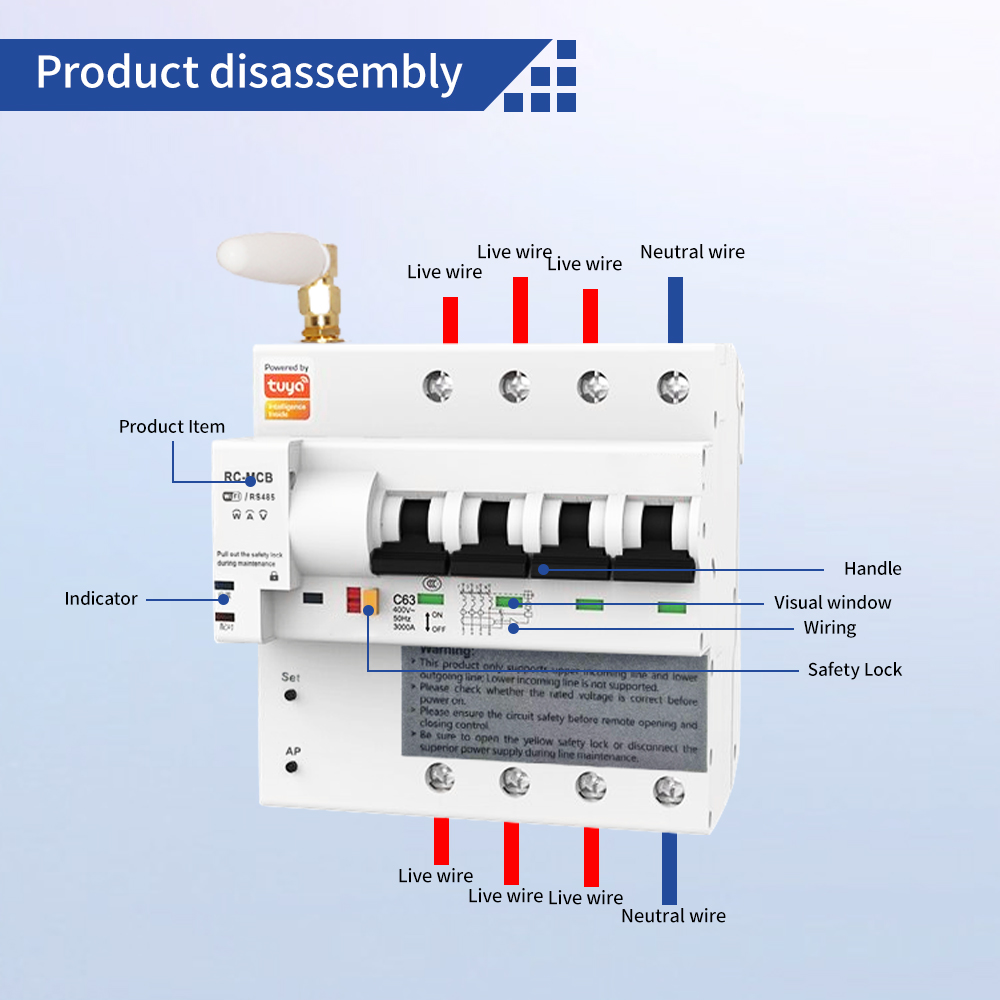
Using an external antenna is the most technically sound and effective solution. Many premium automation models feature a dedicated SubMiniature version A port for an external magnetic antenna. This brilliant design allows you to mount the breaker safely inside the metal box. You then route the thin coaxial wire outside the steel door or panel. Placing the receiver in open air completely bypasses the Faraday cage effect. You restore full signal strength without compromising fire safety.
If replacing the breaker hardware is not an option, you can brute-force the signal. Plug a standard wireless repeater into a wall outlet directly outside the utility room. This minimizes the distance the signal must travel. The repeater blasts a concentrated, high-strength wave. This wave has a much higher probability of penetrating the structural gaps of the metal door.
Commercial buildings, factories, and industrial facilities inherently feature thick reinforced concrete and heavy metal distribution panels. Implementing modern automation in these environments requires specialized, enterprise-grade hardware.
Commercial infrastructure typically operates on three-phase power systems. These systems handle massive electrical loads for heavy machinery, server rooms, and large-scale HVAC units. In these complex setups, a 4-pole WiFi circuit breaker is utilized to simultaneously control and monitor three live wires and one neutral wire. Integrating smart technology at this level enables facility managers to isolate faults remotely. They can schedule automated shutdowns during off-peak hours and conduct highly accurate energy audits.
Industrial environments cannot rely on standard consumer routers due to heavy electromagnetic interference from nearby machinery. Facility managers increasingly adopt hybrid solutions to navigate this. Enterprise deployments overcome physical barriers by installing hardwired Ethernet access points directly inside the electrical control rooms. Specifically, industrial smart breakers are almost exclusively deployed with high-gain external antennas to ensure uninterrupted synchronization with the central Building Management System.
Selecting hardware for a challenging physical environment requires careful attention to technical specifications. Do not just look at the software app. Ensure the product you choose is engineered for both reliability and life safety.
The ability to attach an external receiver is your absolute best defense against metal interference. Before purchasing, strictly verify the manufacturer specifications to ensure the unit includes an external antenna interface. Devices limited to internal printed circuit board antennas will inevitably struggle behind thick steel.
Wireless networks drop. Internet service providers experience outages. Because of this, a reliable automated breaker must retain the familiar click of a manual physical toggle switch. If the steel door successfully blocks the signal, personnel must still be able to manually trip or reset the breaker. This ensures uninterrupted facility operations and life safety.
It is imperative to remember that this hardware is fundamentally a safety device. Regardless of its app integrations or cloud capabilities, the unit must possess independent hardware-based overload and short-circuit protection. It should trigger instantaneously to prevent electrical fires. This safety mechanism must remain completely independent of its wireless connection status.
Proper installation methodology mitigates signal loss. It also ensures strict compliance with electrical safety standards.
Conduct a diagnostic test before physically wiring the unit into the live panel. Place your smartphone inside the metal distribution box. Close the steel door and monitor the network strength using an analyzer app. Check the Received Signal Strength Indicator. A value between negative 30 and negative 67 decibel-milliwatts indicates a healthy connection. If the signal drops below negative 80, you must implement an antenna or extender solution before proceeding.
Exercise extreme caution when routing an external cable out of a metal box. Utilize existing knockout holes and line them with rubber grommets to pass the wire through safely. Never pinch the delicate coaxial cable between the heavy steel door and the frame. Doing so will sever the internal wiring, ruin data transmission, and potentially create a dangerous grounding hazard.
Working inside a distribution panel carries a severe risk of fatal shock. Always disconnect the main power supply before opening the box. Verify the current is dead using a reliable multimeter. If you lack experience with electrical systems, hire a certified electrician. They will ensure the installation complies with all municipal building codes.
A steel door or metal distribution box undoubtedly poses a significant challenge to wireless signals. However, it certainly does not mean you have to abandon your building automation goals. Understanding the physical limitations of radio waves is the first step. Choosing the appropriate equipment is the next. By selecting a unit equipped with an external antenna or strategically boosting your network near the utility room, you can easily overcome electromagnetic interference.
Ready to upgrade your electrical infrastructure without worrying about signal loss? Whether you need a standard 2P 63A module for your residential panel or a heavy-duty 4P controller for commercial automation, choosing the right hardware is crucial. Explore the complete range of enterprise-grade and residential smart electrical solutions at People Elect to find the perfect fit for your specific environment. Planning your network topology and hardware selection in advance guarantees a seamless, safe, and highly responsive electrical system.
Yes. A metal breaker box acts as a partial Faraday cage. This severely weakens or completely blocks incoming and outgoing network signals. To mitigate this interference, empirical data suggests using a unit equipped with an external antenna that can be safely mounted on the outside of the metal enclosure.
You can perform a simple field test using your smartphone. Turn on a WiFi analyzer app, place your phone inside the unpowered metal box, and close the door. Check the Received Signal Strength Indicator reading. If the reading is worse than negative 80 decibel-milliwatts, the signal is too weak for reliable automation control.
Yes. High-quality automated breakers are designed with safety as their primary function. They always feature a manual physical toggle switch. If the steel door obstructs the signal or your local internet connection goes down, the breaker continues to provide standard electrical protection. You can physically turn it on or off by hand.
Absolutely. As long as the device features independent, hardware-based overload and short-circuit protection, it is perfectly safe. The smart module will trip and cut power during an electrical fault exactly like a traditional breaker, regardless of whether it is connected to the internet or enclosed in steel.
A 2-pole breaker is typically utilized for single-phase power setups. These are standard in residential homes for 240V appliances like dryers and ovens. Conversely, a 4-pole breaker is engineered for three-phase electrical systems common in commercial and industrial facilities. It safely monitors and controls three live wires and one neutral wire simultaneously.
No. Physics dictates that higher frequency 5GHz signals have much shorter wavelengths. This makes them significantly worse at penetrating solid objects like steel, masonry, and reinforced concrete. This is the primary reason almost every automation device on the market is engineered to operate exclusively on the 2.4GHz band.